Recently I bought a Mac mini M4 to replace mini M1 which I was using for 5 years. There were no issues with M1 but I just wanted to have a new one. Maybe I should do a lot more AI-intensive projects to justify my spending.
The new M4 is much smaller and sits nicely on my piano. I wondered why/how the downsize was possible – it turned out that M1 just has lots of empty space inside because it reuses the case for intel chip models to speed up the time-to-market.
My first AI project is to try speech-to-text models. My final goal is to establish personal realtime, multi-language (en, jp, kr, ch) machine-translation environment running locally on my pc or hopefully on my phone.
OpenAI’s Whisper seemed a good choice for the first try.
I tried the project whisper.cpp which allows us to run the model locally on different platforms. It says – “Apple Silicon first-class citizen” – very good.
Clone it, build it, run the sample – all works nicely.
Aside from the “base english only” model, I also downloaded “base” and “medium” models. The base model has 148 MB in file size but medium has 1.5 GB.
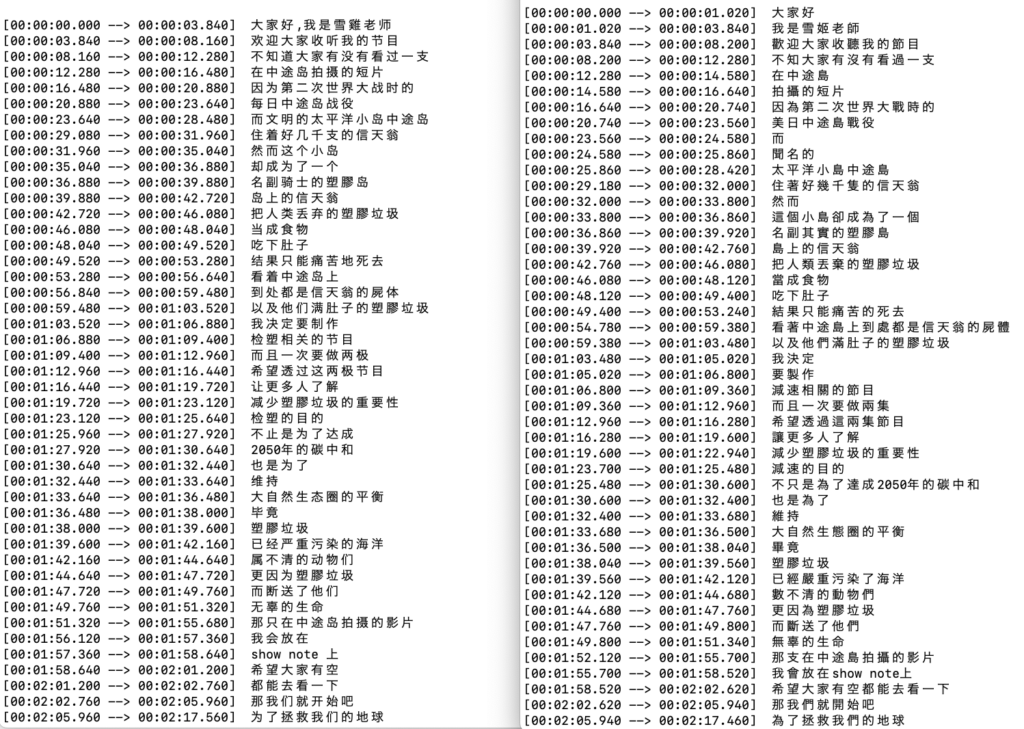
I am mainly interested in how the model works with non-English languages so I first tried a Chinese podcast audio file – it seemed work fine on both models. One big difference is the output of base model is in Simplified Chinese which is used in mainland China while medium model output uses Traditional Chinese which is used mainly in Taiwan and Hong Kong. The speaker is Taiwanese so the medium model seemed to detect the subtle difference between the two, which is very awesome!
I then recorded my own voice reading a weather news article in Japanese. Here are the results:
medium model:
[00:00:00.000 –> 00:00:12.000] 明日12日にかけて、年に何度もないレベルの強烈寒気の影響で、日本海側を中心に大雪や毛布吹に警戒が必要です。
base model:
[00:00:00.000 –> 00:00:04.040] 明日12日にかけて年に何度もないレベルの
[00:00:04.040 –> 00:00:08.380] 協力環境の影響で日本海岡を中心に
[00:00:08.380 –> 00:00:11.840] 大雪や蒙風武器に警戒が必要です
Red text indicate the wrong output. Medium model has clearly fewer mistakes.
I also compared processing speed with different modes, “no gpu” options and with my old M1 mac.
| with GPU | no GPU (-ng option) | |
| M1 base | 550 ms | 1200 ms |
| M1 medium | 3400 ms | 9300 ms |
| M4 base | 330 ms | 700 ms |
| M4 medium | 1700 ms | 5050 ms |
I could see x1.6 ~ x2.0 speed improvement of M4 on both with/without GPU. I think this barely justifies the $600 purchase.
That’s it for today!
